


Screenshots
Periodic screen capture at configurable intervals, with dual-monitor support.
Enterprise-grade security backed by GDPR, HIPAA, ISO 27001 & SOC 2 compliance. Know more

Choose silent or interactive monitoring per team. Capture every event at 1-second precision. Validate connectivity, don't assume it. And let employees see what managers see.

80,000 users, 600+ customers, 20 countries







From mode selection to forensic-grade audit, monitoring built for trust and accountability at the same time.
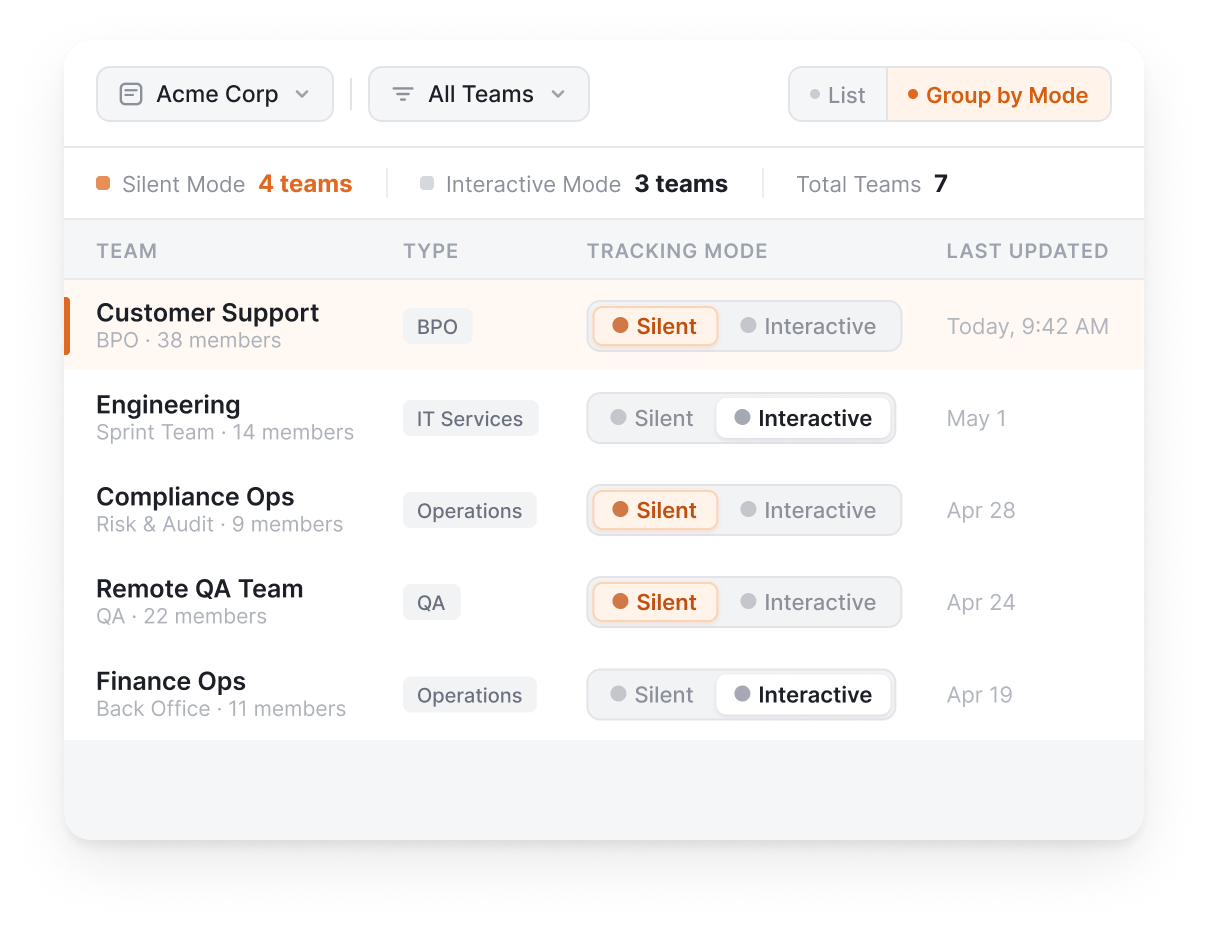
Silent or interactive, per team.
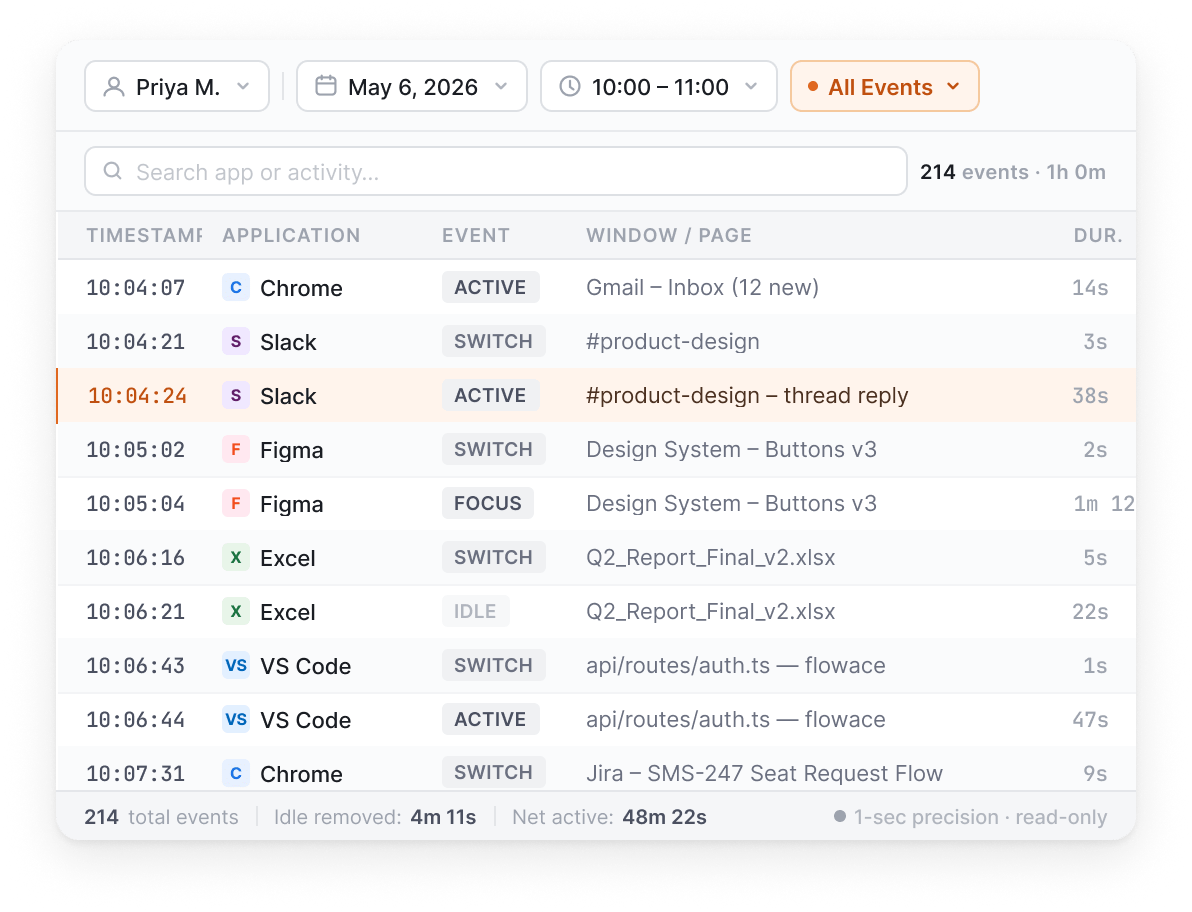
Apps, websites, screenshots, input frequency.
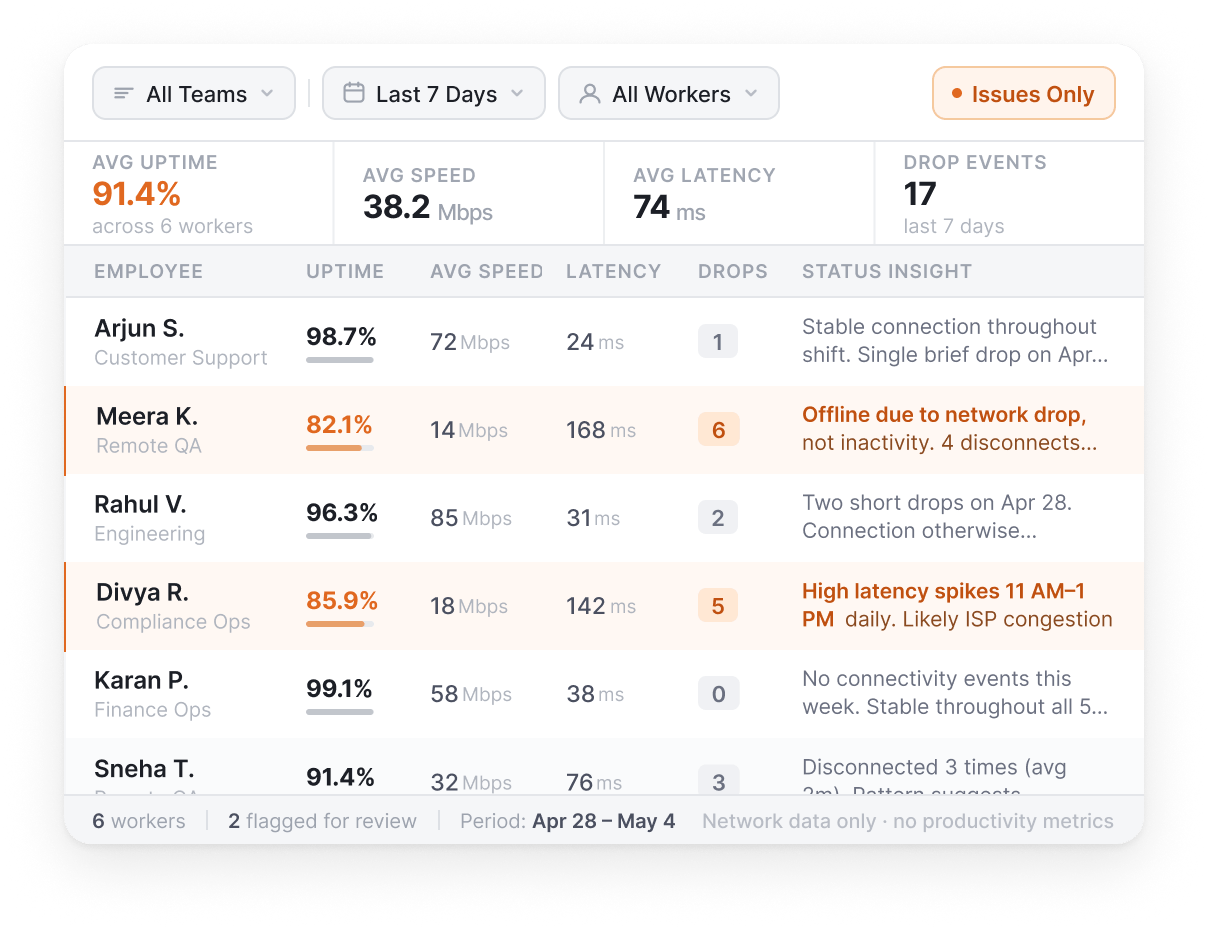
Distinguish offline from disconnected.
Built in, not bolted on.
Audit-ready, dispute-ready, decision-ready.
Everything you need to monitor work transparently and review it with forensic detail when it matters.
Background monitoring without employee-facing UI.
Choose monitoring mode per team, not per platform.
Event-by-event activity records at 1-second precision.
Forensic-grade detail for compliance reviews and dispute resolution.
Tracks uptime, speed, and latency for remote worker infrastructure.
Distinguishes "employee offline" from "employee disconnected."
Other Features
Periodic screen capture at configurable intervals, with dual-monitor support.
Track input frequency (not keystrokes) to measure engagement.
Employee-visible app with bubble for project selection.
When enabled, nothing is tracked. Equivalent to not having the desktop app installed.
Built for your industry
Configure monitoring intensity, capture controls, and audit-trail formats to match how your industry actually operates.
What this industry watches for
Captures time, app usage, and workflow patterns, never the patient data itself.
Know moreWhat this industry watches for
Monitoring data stays within configurable boundaries, wherever your frameworks require.
Know moreWhat this industry watches for
Agent activity, adherence, and screen sessions, stored per campaign with configurable retention.
Know moreWhat this industry watches for
Tracks how time is spent across apps, never the underlying client files or financial data.
Know moreWhat this industry watches for
Scoped to application activity and work patterns.
Know moreApp and website tracking, productivity ratings, dashboards, and AI-flagged patterns. See where every hour of work actually goes.
Read moreProject hierarchy, billable hours, automatic timesheets. Track claims, matters, sprints, or cases. Whatever your industry calls work.
Read moreAttendance, shifts, leaves, expenses, and approvals. One platform, no separate HRMS.
Read moreReal numbers from companies running Flowace today. Each one a story worth a read.
Netscribes
9.6 hrs
recovered per team member per week, with transparent monitoring that the team agreed to use.
Uplers
31%
productivity improvement across remote engineering teams using Interactive Mode visibility.
Gravitas Legal
37 min
saved per attorney per day with privilege-aware activity capture for client billing.
How do you prove compliance and safeguard company assets without crossing into surveillance that damages trust? Regulators like the EU’s GDPR and California’s CCPA…
Read more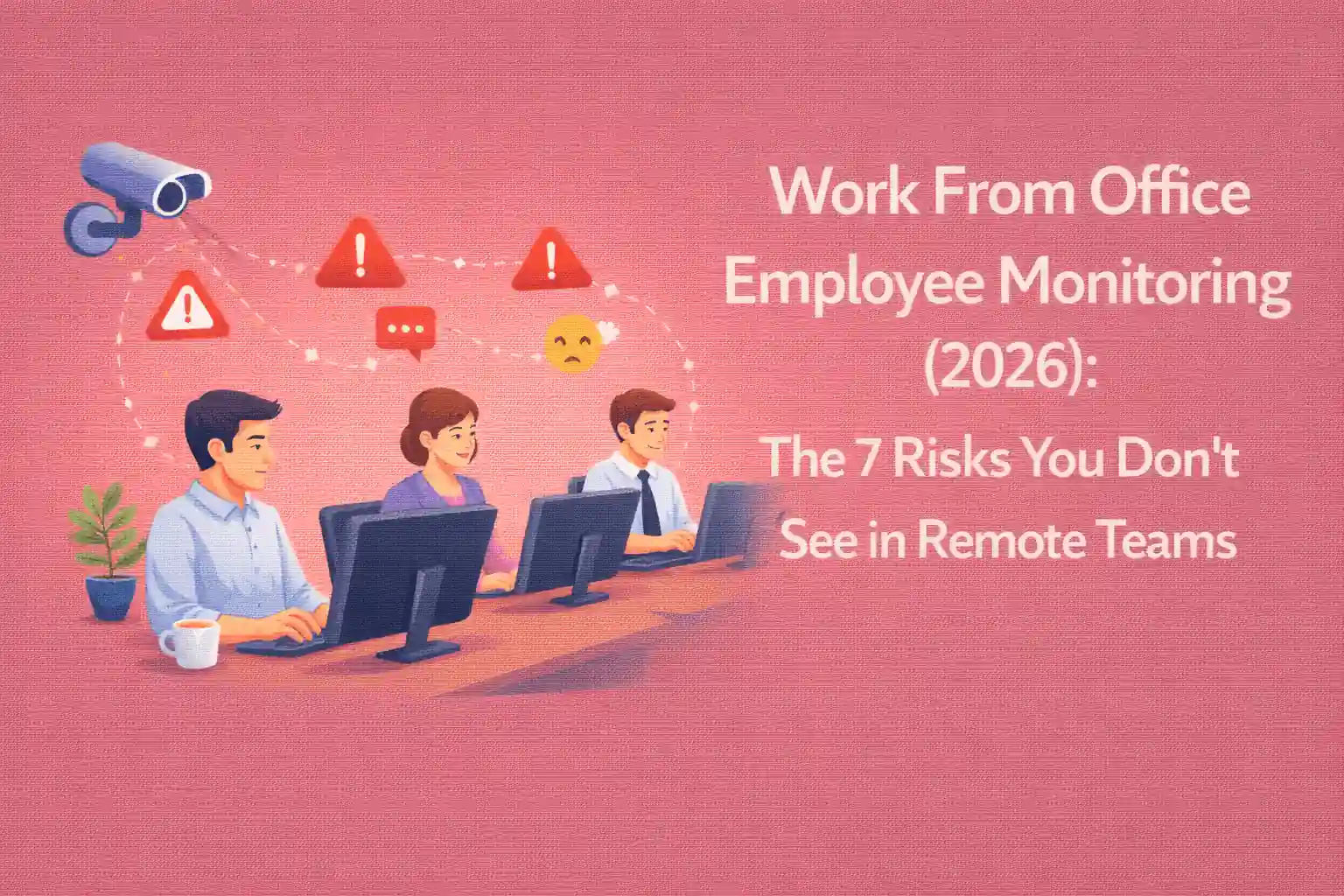
Key Takeaways: Presence ≠ Productivity in 2026 Being physically present in the office is no longer a reliable indicator of performance. Managing visibility leads…
Read more
ActivTrak vs Flowace A thorough comparison of Flowace and ActivTrak should take into account a number of variables, including user reviews, cost, productivity boosts, software features, and the advantages and disadvantages of each program. ActivTrak Software ActivTrak is renowned for its robust tracking capabilities, offering detailed insights into how time is…
Read moreFlowace Employee Monitoring is the activity-visibility layer of Flowace’s workforce intelligence platform. Employee monitoring software typically captures workplace activity across desktops and laptops to give managers visibility into how time is spent. Flowace is built around transparency: configurable per team, with privacy controls visible to employees, and forensic-grade activity logs for legitimate compliance needs.
Flowace differentiates on three dimensions: monitoring mode flexibility (Silent or Interactive per team, not per platform), data quality (1-second activity logs vs. 30 to 60-second sampling), and employee fairness (Privacy Mode for full opt-out, employees see what managers see). Flowace Employee Monitoring is built around the principle that monitoring should be transparent, not covert.
Not if you set it up correctly. Use Interactive Mode (employee-visible app), enable Privacy Mode for opt-out, and let employees see their own data. Communicate clearly what is and isn’t tracked. Companies that deploy Flowace with transparency report higher engagement, not lower.
No. Flowace tracks input frequency to measure engagement, but never captures actual keystrokes. There is no keylogger, ever.
Privacy Mode is a per-user toggle that disables all tracking. When enabled, nothing is captured: no screenshots, no timesheets, no activity data. It is functionally equivalent to not having the desktop app installed. Employees or admins can switch it on for breaks, personal time, or by policy.
Silent mode runs in the background with no user interface visible to the employee. Interactive mode shows an employee-visible app with a project bubble for tagging time. The choice is configurable per team within the same install. Silent works well for compliance-heavy operations like BPO; Interactive works for IT services and remote teams who benefit from seeing their own data.
In most jurisdictions yes, on company-owned devices, for a stated business purpose, with the workforce informed. What varies is not whether you may monitor but what you must tell people first, how much you may collect, and how long you may keep it.
In the United States, federal law permits monitoring on employer equipment, and Connecticut, Delaware and New York require written notice to employees. In the European Union and the United Kingdom, the GDPR requires a lawful basis, and for monitoring that basis is normally legitimate interests, which obliges you to run and document a balancing test and, for higher-risk monitoring, a data protection impact assessment. Consent is a weak basis in an employment relationship because regulators treat it as not freely given. In India, the DPDP Act 2023 requires notice and purpose limitation, covered in the next answer. In Canada, PIPEDA and its provincial equivalents require the collection to be reasonable in the circumstances, and Ontario requires a written electronic monitoring policy for employers with 25 or more employees.
Three rules hold across all of them. Monitor the device, not the person, which means work hours on work equipment. Tell people in writing before you switch anything on, using a monitoring policy they have actually received. Collect the least you need for the stated purpose, which is why screenshot frequency and retention are the two settings your legal team will ask about first. This is general information rather than legal advice, and a jurisdiction-specific review is worth the hour it costs.
The Digital Personal Data Protection Act 2023 treats an employer as a data fiduciary and an employee as a data principal, which means monitoring is lawful but conditional. Employment is a recognized legitimate use under the Act, so you are not dependent on consent for activity data tied to work, but the notice, purpose limitation and security obligations still apply in full.
Four requirements matter in practice. Notice must be clear, itemized and given in English or any language in the Eighth Schedule, and it must state what is collected and why. Purpose limitation means data captured for productivity measurement cannot quietly become the evidence base for a disciplinary process you never disclosed. Storage limitation means you delete when the stated purpose ends, which makes your retention window a compliance decision rather than a storage one. Reasonable security safeguards are mandatory, and a breach must be reported to the Data Protection Board.
For a Flowace deployment in India this comes down to three settings and one document: the retention window, whether screenshots are on, who holds admin access, and a written notice each employee has received. Flowace’s hosting, encryption and data residency position is on the security and compliance page. Indian BPO and GCC teams running client-mandated monitoring usually need this evidence twice, once for their own legal review and once for the client’s, which is covered under BPO deployments. Again, general information rather than legal advice.
A policy that holds up has seven parts, and the shortest version that covers all seven beats a long one that misses two.
State the purpose in plain terms, such as capacity planning or client billing accuracy, because a purpose you cannot name is a purpose you cannot defend. State the scope, meaning which devices, which roles, and whether it applies on personal equipment, which for Flowace it does not. State what is collected, itemized: app and URL activity, active and idle time, and screenshots if you have them switched on. State the hours, which for most deployments is working hours on company devices and nothing outside them. State who can see it, by role, and name the person accountable for access changes. State the retention window as a number of days, not as “as long as necessary”. State how an employee raises a question or a correction, and who answers it.
Two additions carry more weight than their length suggests. Say what monitoring is not used for, because a stated exclusion is the fastest way to lower the temperature in an all-hands. And record the date and version, because the first thing a regulator or a works council asks is when the policy changed and who was told.
Flowace supports the technical side of every clause above through silent and interactive modes, role-based access and configurable retention, with the current posture documented on the security and compliance page. Teams comparing options against this checklist usually end up reading how the tools differ on configurability, which is where the policy clauses become build decisions.
In Interactive Mode, yes, there’s a visible app in your system tray and you choose what you’re working on. In Silent Mode there’s no interface, but your employer is required to disclose that monitoring is in place, and you can ask to see your own dashboard. Employees see exactly what managers see.
No. Flowace has no live screen viewing and no camera or microphone access. It captures periodic screenshots at intervals your employer configures, and Privacy Mode switches capture off entirely.
Active and idle time, which applications and websites you used, periodic screenshots if enabled, and input frequency, never the keystrokes themselves. Not your personal accounts, not your files, not your camera.



Experience seamless time tracking and productivity enhancement like never before. Join the Flowace revolution and unlock your full potential. Start your journey to success today!”




